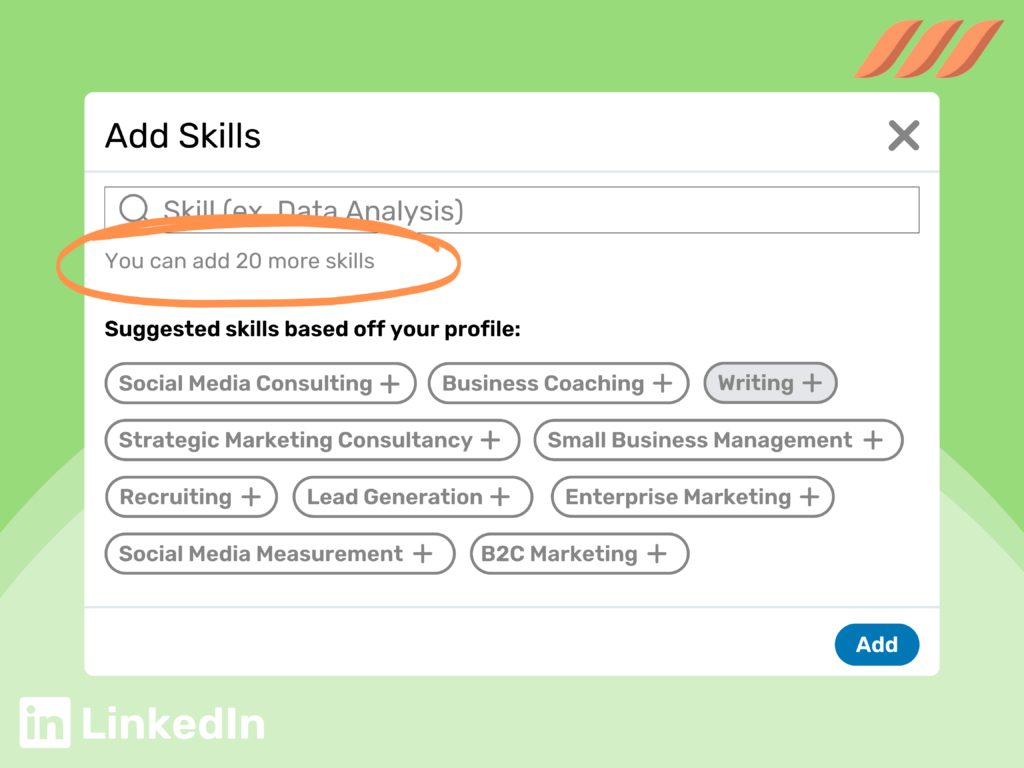
LinkedIn now lets you list up to 100 skills (the old limit was 50), but the best answer is still 15-25, chosen deliberately. Only your top two skills show before someone clicks “Show all,” so a focused list does far more for you than a full one.
LinkedIn’s Actual Technical Limit
According to LinkedIn’s own help documentation, you can now list up to 100 skills on your profile, double the old limit of 50. LinkedIn also notes that skills attached to a specific role in your Experience section don’t count toward that 100.
The interface, though, only shows your top two skills by default. Everyone else has to click “Show all” to see the rest, which makes those first two slots the most visible real estate in the entire section.
The 100-skill ceiling exists so people can cover wide or technical backgrounds without hitting a wall. It was never meant to be read as a target. Treating it as a checklist to fill is like assuming a resume should be as long as possible because the software enforces no page limit.
Why More Isn’t Better
It Dilutes What Actually Matters
If you list 90 skills, ranging from your actual specialty to “Microsoft Office” and “Teamwork,” anyone scanning the list has to work harder to figure out what you’re good at. Recruiters and hiring managers skim; they don’t study.
It Can Look Unfocused
A profile listing skills across five unrelated disciplines can read as scattered rather than versatile, particularly if you’re positioning yourself for a specific type of role. Focus reads as expertise. Breadth without focus can read as uncertainty about your own specialty.
Endorsements Cluster Around What’s Already Popular
People tend to endorse whatever skill sits at the top of your list or is the most obvious guess, not necessarily your most important one. If your most valuable skill is buried in position 60, it may never gather the endorsements that make it look credible. With 100 slots available, burying your best skill is easier than ever.
A Long List Can Signal You Haven’t Prioritized
There’s an implicit message in a carefully curated list of 18 skills versus a maxed-out list of 100. The first suggests someone who knows exactly what they’re good at. The second can suggest someone who added everything they could think of instead of making decisions about their own positioning.
A Realistic Example
Imagine two marketing managers with nearly identical backgrounds. The first lists 90 skills, including “Microsoft Excel,” “Public Speaking,” “Teamwork,” “Social Media,” and dozens of similarly broad entries. The two skills visible by default don’t obviously relate to each other.
The second lists 18 skills, all specific to B2B demand generation: “Marketing Automation,” “Lifecycle Marketing,” “Demand Generation,” “Salesforce,” and “ABM Strategy.” The two most search-relevant terms lead the list, so they’re the first thing anyone sees.
A recruiter searching for “demand generation” or “ABM” finds the second profile immediately. The first profile might technically include relevant terms somewhere in those 90 entries, but between the clutter and the arbitrary top two, it does a much weaker job of showing what this person specializes in.
The Real Answer: How Many You Should Actually List
A range of 15-25 skills works well for most professionals, with meaningful variation by career stage and how established your specialty is. The jump from 50 to 100 slots doesn’t change that math. It just raises the ceiling you’re choosing not to hit.
| Career stage | Suggested range | Why |
|---|---|---|
| Entry-level | 10-15 | Fewer skills to draw from yet, and it’s better to list what’s genuinely true than pad the list |
| Mid-level | 15-20 | Enough range to show depth in a function without diluting focus |
| Senior / executive | 20-25 | A broader scope of responsibility genuinely spans more skill areas |
| Highly specialized / technical | 20-30 | Specific tools, languages, or certifications often need individual listing |
For more on what else shifts by career stage, see the entry-level and senior-level resume pages. Skills strategy tends to track closely with how your resume evolves at each stage.
How to Choose Which Skills Make the Cut
Quantity is only half of this question. Which skills you choose matters just as much as how many. I’ve written a full breakdown of how to choose which skills to include, but the short version is: start from the job descriptions of roles you actually want, not a generic list of buzzwords you assume sound impressive.
A practical way to narrow the list: pull up 3-5 job postings for roles you’d genuinely want next, and note which skills appear repeatedly. Those repeated terms are a strong signal of what recruiters in your niche are searching for. They should heavily influence both your full list and the two skills you put first.
It’s also worth separating skills that belong in this dedicated section from skills that are better woven into your About section as narrative. The Skills section is built for scanning and search matching: short, discrete terms. Your About section is where you demonstrate a skill in context, through a real example, rather than just naming it. Strong profiles use both, and neither should try to do the other’s job.
Your Top Two Visible Skills Matter Most
Only two skills show by default before a visitor clicks “Show all,” so treat that choice as the most important part of this whole exercise. Ask yourself: if a recruiter saw only two skills and nothing else about you, which two would most accurately and compellingly represent your value?
Those two should usually be the skills most central to the roles you’re targeting right now, not necessarily the ones you’re proudest of historically. A skill you’re deeply experienced in but actively moving away from professionally shouldn’t occupy one of your two most visible slots.
The skills just below them still matter. They’re what a recruiter sees after clicking through, and they’re what LinkedIn’s search can match against. Reorder your list so the most relevant skills sit near the top, not wherever they happened to land when you added them.
How Endorsements Factor In
Endorsements add a layer of social proof, but they’re easy to over-index on. A skill with 60 endorsements from people who never worked with you on it isn’t more credible than one with 5 genuine endorsements from close colleagues. It just looks that way at a glance.
Resist endorsement-trading groups and automated endorsement exchanges. It’s a common tactic, and it’s easy for anyone paying attention to spot as inauthentic, particularly when someone with no obvious connection to a skill has endorsed it anyway.
What About Skill Assessments and Badges?
LinkedIn also offers skill assessment quizzes for certain skills, and passing one adds a verified badge next to that skill on your profile. These are worth doing selectively for your most important 2-3 skills, particularly technical or measurable ones like specific software platforms or languages, where a badge adds real, verifiable credibility.
They’re less useful for soft skills or broad categories without a meaningful assessment format, and there’s no need to work through every available quiz just because the option exists. The same “curate, don’t maximize” principle applies here too.
Does This Change by Industry?
Somewhat. Highly technical fields such as software engineering, data science, and IT often justify a longer, more specific list, since individual tools, languages, and platforms each warrant their own entry (Python, SQL, AWS, and Kubernetes each function as a distinct, searchable term). The higher 100-skill ceiling gives these professionals real breathing room.
Fields built around relationship or strategic skills, such as sales, marketing, consulting, and general management, usually do better with a tighter, more curated list. The differentiation there comes from specialization and results, not from a long inventory of discrete tools.
Common Mistakes People Make
- Filling all 100 slots regardless of relevance, just because the option exists.
- Never revisiting the list after the first time it was created, even as a career evolves.
- Leaving the two visible skills to whatever LinkedIn defaulted to, rather than choosing them deliberately.
- Listing overly generic skills (“Communication,” “Teamwork”) that don’t differentiate you from any other candidate.
- Ignoring the Skills section entirely, which wastes a section recruiters specifically filter and search by.
How This Fits Into a Broader, Optimized Profile
Your skills section doesn’t work in isolation. It should reinforce the same story your About section tells and fit the overall structure of a healthy LinkedIn profile. If you’re rethinking your skills list, it’s often a sign the rest of the profile is due for a look too. And if you’re weighing whether to handle that yourself or bring in help, the DIY-vs-professional breakdown covers that decision in more depth.
Keeping your profile active matters here as well. Skills you update alongside regular LinkedIn engagement tend to stay more current than a profile that’s touched once and forgotten.
Why This Actually Matters for Getting Found
This isn’t cosmetic. SHRM, the leading professional association for HR and talent-acquisition practitioners, has noted that recruiters increasingly rely on skills-based search and filtering tools. A well-curated, accurate skills section therefore directly affects whether you surface in a recruiter’s search at all.
General job search guidance from Indeed’s Career Guide reinforces the point: specific, relevant keywords, not a maximized quantity of them, tend to perform better across virtually every part of a job search profile, resumes included.
The Bigger Picture
It’s worth stepping back from the specific number for a second. The goal of your skills section isn’t to satisfy an algorithm or hit a target count. It’s to make it effortless for the right person to recognize, in about two seconds of scanning, exactly what you’re good at.
The jump from 50 to 100 slots gives you more room, but a shorter, sharper list still does that job better than a longer, vaguer one almost every time. That is the entire argument behind 15-25 rather than 100.
Frequently Asked Questions
What is the maximum number of skills you can list on LinkedIn?
You can list up to 100 skills in the Skills section. The previous limit was 50. Skills tied to a specific role in your Experience section don’t count toward that total.
How many skills show on my profile by default?
Two. Visitors see your top two skills first and have to click “Show all” to see the rest, so those two slots should hold your most relevant, most search-friendly skills.
Does having more skills listed improve my LinkedIn search ranking?
Not automatically, and possibly the opposite if irrelevant skills dilute your profile’s clarity. Relevance and endorsement quality tend to matter more than raw skill count.
Can I remove skills I added a long time ago?
Yes, and you should periodically. A skills section should reflect your current professional direction, not everything you’ve ever touched throughout your career.
Do endorsements from people I don’t know well hurt my profile?
They’re not damaging, but they don’t add much credibility either. A smaller number of endorsements from people who genuinely worked with you on that skill carries more weight than a large number from casual connections.
Should my skills list match my resume keywords exactly?
They should overlap significantly, since both are trying to surface you in searches for similar terms. See how resume keywords work for the same underlying logic applied to your resume.
What if I don’t know which two skills to show first?
Start with the skill most central to the job you want next, not the job you’re in now, if you’re trying to make a change. Ask a colleague or mentor which skill they’d associate with you first. That often reveals your actual professional reputation more clearly than your own guess.
How often should I update my skills list?
Whenever your role or responsibilities change meaningfully, and at minimum once a year even without a major change, just to prune anything outdated or no longer relevant.
Is it bad to have zero endorsements on a skill?
Not necessarily, particularly for a newly added or highly specific skill. It’s more important that the skill itself is accurate and relevant than that it already has social proof attached.
Should I list soft skills like “leadership” or “communication”?
Sparingly, and only if they’re specific enough to be meaningful. “Cross-functional team leadership” tells a reader more than “Leadership” alone. Generic soft skills are the ones most likely to get cut when you trim a bloated list down to something focused.
What happens if I have fewer than 15 relevant skills to list?
That’s completely fine, particularly earlier in a career or within a narrow specialty. A shorter, entirely accurate and relevant list is always preferable to padding it out with weaker entries just to hit a target number.
Want Help Getting This Right?
If your skills section still reflects a job you had five roles ago, that’s worth fixing. I’m Kyla Duffy, and my LinkedIn profile optimization services include a real look at your skills, keywords, and overall profile strategy, not just a copy-paste from your resume. Curious what that costs? My rates are posted publicly, and my FAQ page covers what people usually ask first.