To write a resume, start by studying the job you want, then build your resume in this order: a clean header with your contact info, a targeted title and summary, a work experience section full of results-based bullet points, a skills section, and your education and credentials. Use a simple reverse-chronological format, keep it to one or two pages, mirror the keywords from the job description, and proofread it out loud before you hit send.
That’s the short version. The long version (the one that actually gets you interviews) is below.
Here’s what I’ve learned writing resumes for everyone from new grads to executives: most people don’t have a resume problem. They have a clarity problem. They open a blank document, try to remember everything they’ve ever done, and three hours later they have a long list of duties and a headache.
So let’s do this differently. Below is exactly how I write a resume for a client, with examples you can steal. You’ve got this!
In this guide
- Figure out who you are
- Step 1: Study the job
- Step 2: Choose the right resume format
- Step 3: Write your resume header
- Step 4: Write a resume title and summary
- Step 5: Write your work experience
- Step 6: Add a skills section
- Step 7: List education and credentials
- Step 8: Tailor your resume and pass the ATS
- Step 9: Get the length right
- Step 10: Proofread and run the seven-second test
- How to write a resume with no experience
- Resume example + free template
- FAQ
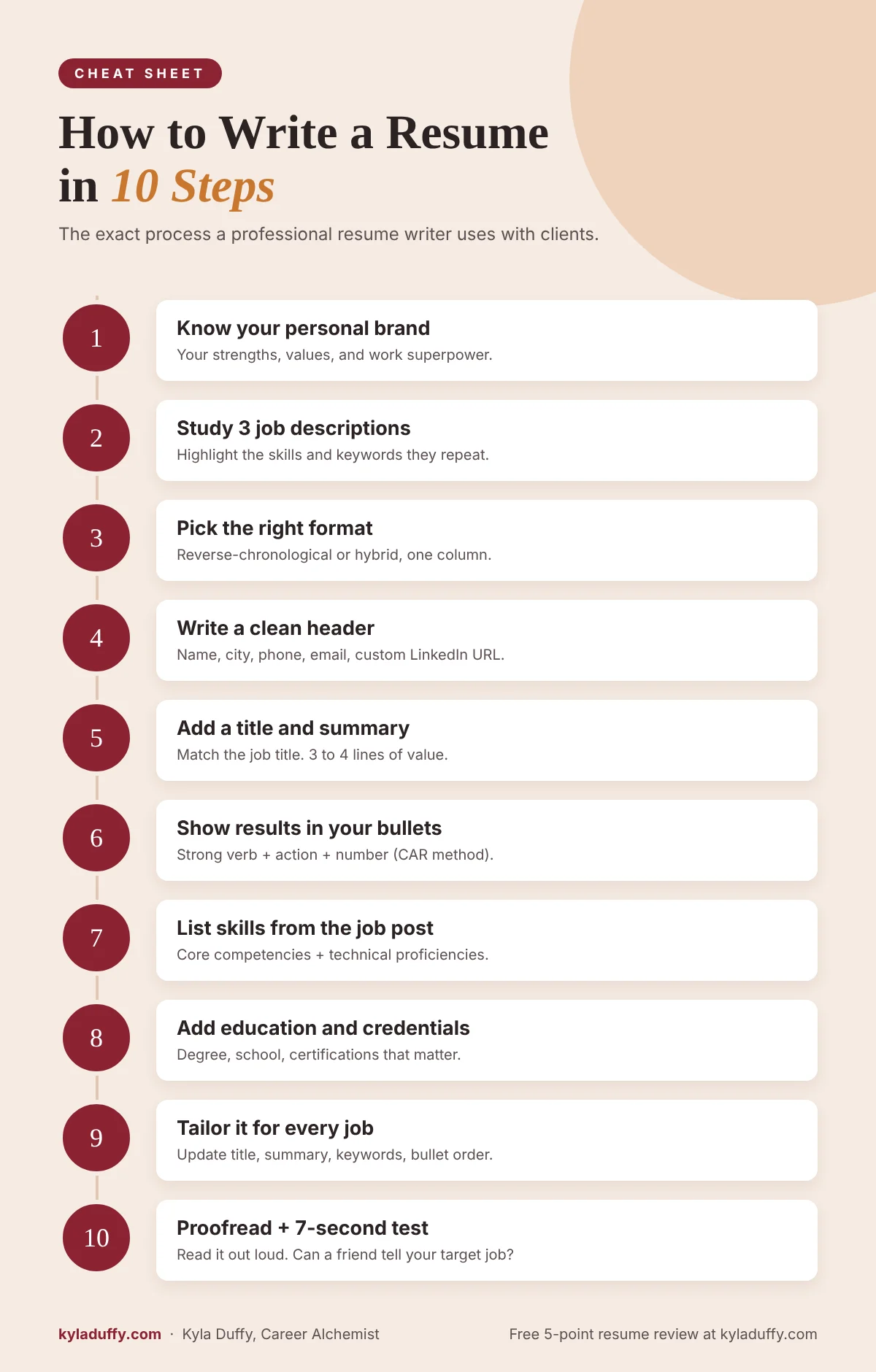
How to Write a Resume: The 10 Steps at a Glance
- Get clear on who you are and what you bring to a team.
- Pull three job descriptions and highlight what employers keep asking for.
- Choose your resume format (reverse-chronological works for most people).
- Write your header with your name, title, and contact details.
- Write a resume title and summary that tells the reader who you are in seconds.
- Write your work experience using achievement-focused bullet points.
- Add a skills section that matches the job.
- List your education, certifications, and credentials.
- Tailor it for every application so it passes ATS software and human eyes.
- Proofread and run the seven-second test before you send it.
Now let’s go through each one.
Before You Write a Word: Figure Out Who You Are
Your resume is a marketing document, not your autobiography. Its only job is to convince a hiring manager you’re worth a 30-minute conversation. To do that, you need to know your personal brand.
Answer these questions honestly (on paper, not just in your head):
- What adjectives would you use to describe yourself at work? (I.e., self-motivated, calm under pressure, detail-obsessed.)
- What hard and soft skills do you really excel at?
- What’s it like for people to work on a team with you?
- What’s your work-related superpower? The thing people always come to you for?
Then do the part people skip: text three coworkers or friends and ask where they think you excel and what you’re like as a teammate. Their answers give you resume language that sounds confident without sounding like bragging.
Step 1: Study the Job Before You Write the Resume
This is the biggest difference between a resume that gets ignored and a resume that gets calls. You can’t write a strong resume for “a job.” You write it for a specific kind of job.
Pull up three job descriptions for roles you’d love. Copy them into a document and highlight:
- Job titles and the words they use for the role
- Hard skills, tools, and software (Salesforce, Excel, Python, HIPAA, etc.)
- Soft skills they repeat (stakeholder management, communication, leadership)
- Results they care about (revenue, retention, efficiency, safety, growth)
Now compare the three. Which skills show up in all of them? Those are your resume keywords, and they’re going to show up in your title, summary, bullets, and skills section. (If you want to go deeper here, I wrote a whole post on resume keywords for ATS scanners and human readers.)
Step 2: Choose the Right Resume Format
There are three main resume formats. Here’s how they compare:
| Format | How it works | Best for | My take |
|---|---|---|---|
| Reverse-chronological | Lists your most recent job first and works backward | Most job seekers with steady work history | The safest choice. Recruiters and ATS software both love it. |
| Hybrid (combination) | Opens with a strong summary and skills, then shows chronological experience | Career changers, mid-career and senior professionals | My favorite for most clients. You lead with value, then back it up. |
| Functional (skills-based) | Groups experience by skill instead of by job | Rarely the best option | Recruiters often assume you’re hiding something. Use with caution. |
For most people, I recommend a hybrid layout: summary up top, a short skills section, then experience starting with your most recent role.
What a Resume Should Look Like
Boring, in the best way. A modern resume should be clean, scannable, and easy for software to read.
- Font: Something simple like Calibri, Arial, Garamond, or Helvetica, 10 to 12 point for body text
- Margins: 0.5 to 1 inch
- Layout: One column is safest for ATS. Avoid text boxes, tables, and headers/footers for important info
- Headings: Standard names like “Professional Experience,” “Skills,” and “Education”
- Photos and graphics: Leave them off in the U.S. (Here’s why graphics in resumes usually hurt more than help.)
- File type: PDF or Word (.docx), whichever the application asks for
Want the full breakdown on spacing, fonts, and layout? Check out my guide to resume formatting for 2026.
Step 3: Write Your Resume Header
Your header sits at the top of the page and tells the reader who you are and how to reach you. Keep it tight:
- Your full name (biggest text on the page)
- City and state (no street address needed anymore)
- Phone number
- A professional email address
- Your LinkedIn URL (customized, not the one with random numbers at the end)
- Credentials after your name if they’re relevant to the job (like MBA, PMP, or RN)
Not sure which letters belong after your name? I cover that in do you put credentials after your name on a resume. And if you want examples of headers that work, read how to write a resume header that gets noticed.
Step 4: Write a Resume Title and Summary
This is the most valuable real estate on your resume. A recruiter’s eyes land here first, and in a few seconds they decide whether to keep reading. That’s why I never skip it.
Start With a Resume Title
Right under your header, add a title that matches the job you want. Not the job you have. The job you want. If you’re applying for Senior Project Manager roles, your title is “Senior Project Manager.” If you’re aiming a little higher or sideways, use the language from the job description.
Add a short keyword tagline under it:
SENIOR PROJECT MANAGER
Agile Delivery | Cross-Functional Leadership | Budget Ownership
How to Write a Resume Summary
Your summary is three to four lines answering one question: why should they keep reading? Here’s the template I give clients:
[A few powerful adjectives] professional with expertise in [your areas of expertise]. Proven history of [the greatest value you bring, like “accelerating customer retention” or “boosting revenue”] in [the kind of environment where you thrive]. Passion for [your passion], with strong communication skills leveraged to [how you use them to help your team or customers succeed].
Here’s what that looks like filled in:
Strategic, people-first operations leader with expertise in process improvement, vendor management, and team development. Proven history of cutting costs and boosting efficiency in fast-growing healthcare organizations. Passion for building systems that make work easier, with strong communication skills leveraged to align executives and frontline teams around shared goals.
No fluff, no “hardworking team player seeking an opportunity.” I’ve got a deeper guide on how to write a resume summary that gets interviews if you want more examples.
What About a Resume Objective?
A resume objective talks about what you want (“Seeking a challenging role where I can grow”). A summary talks about what you offer. Employers care much more about the second one. The only time I’d use an objective is if you’re a student or making a big career change and need one sentence to explain your direction. Even then, I’d frame it around value. Here’s more on when resume objective statements still make sense.
Step 5: Write Your Work Experience (This Is Where Interviews Are Won)
Your work experience section is the heart of your resume. For each job, list:
- Job title
- Company name and location (city, state, or “Remote”)
- Dates (month and year is fine)
- Three to six bullet points focused on achievements
The mistake I see most? Bullets that describe duties instead of results. “Responsible for managing social media accounts” doesn’t tell me if you were any good at it.
How to Write Resume Bullet Points That Get Noticed
I use the CAR method with nearly every client: Challenge, Action, Result. What was the problem, what did you do about it, and what changed because of you? Lead with a strong verb, and put a number in there whenever you can.
| Before (duty) | After (achievement) |
|---|---|
| Responsible for social media accounts | Rebuilt the content calendar for 3 social channels, growing engagement 50% in 6 months |
| Processed invoices | Cut invoice processing time 40% by simplifying an outdated approval workflow |
| Trained new employees | Trained 12 new hires on CRM and sales process, shortening ramp-up time by 2 weeks |
| Managed a team | Led a team of 9 through a reorganization, cutting turnover from 35% to 12% in one year |
| Handled customer emails | Answered 80+ customer emails daily while bringing average response time down to 6 hours |
Don’t have exact numbers? Estimate honestly (“roughly 30%”) or use scope instead: team size, budget, number of clients, territories, projects. Something concrete always beats something vague.
For 40 more before-and-after examples, read my guide on how to write powerful resume bullet points. And if you prefer the STAR framework (popular for interviews too), here’s the STAR method for resumes, with examples.
Resume Action Verbs to Start Your Bullets
Starting every bullet with “Responsible for” or “Helped with” makes you sound like a passenger in your own career. Swap in verbs that show ownership:
- Leadership: Led, directed, mentored, built, championed, spearheaded
- Growth: Grew, expanded, increased, accelerated, launched, scaled
- Efficiency: Streamlined, simplified, automated, reduced, cut, consolidated
- Problem-solving: Resolved, rebuilt, redesigned, turned around, diagnosed
How Far Back Should a Resume Go?
For most people, 10 to 15 years is plenty. Recruiters care most about what you’ve done recently. If you have older experience that’s still relevant (say, a big-name employer or a role that matches the job), you can add a short “Earlier Career” line with titles and companies but no dates or bullets.
Step 6: Add a Skills Section That Matches the Job
Your skills section is a quick-scan list for recruiters and a keyword goldmine for ATS software. Pull directly from the job descriptions you highlighted in Step 1.
I like to split skills into two groups:
- Core competencies: 8 to 12 skills tied to the role, like “Budget Management,” “Stakeholder Communication,” “Process Improvement,” or “B2B Sales”
- Technical proficiencies: Tools and software, written as a simple line: “Technical proficiencies include Salesforce, HubSpot, Microsoft Office Suite, and Tableau.”
Only list skills you’d be happy to discuss in an interview, and don’t rate yourself with stars or bars. “Excel: 4 out of 5” just makes the reader wonder what you can’t do.
Step 7: List Your Education, Certifications, and Credentials
Here’s how to list education on a resume without overthinking it:
- Degree name, school name, and location
- Graduation year (optional if you graduated more than 15 years ago)
- GPA only if you’re a recent grad and it’s 3.5 or higher
- Honors, relevant coursework, or a thesis if you’re early in your career
Experienced? Education goes near the bottom. Student or recent grad? Put it near the top, since it’s your strongest selling point.
Add a separate “Certifications” or “Professional Development” section for licenses, certificates, and training that matter to the job. If you’re unsure what earns a spot, here’s my take on what you should include on your resume in 2026.
What to Put on a Resume (and What to Leave Off)
Optional sections like volunteer work, awards, languages, publications, and side projects are worth adding only if they strengthen your story for this job. (Here’s how to talk about a side hustle on your resume.) What to leave off: references (or “references available upon request”), hobbies that don’t connect to the job, your full street address, your photo, and personal details like age or marital status.
Want a second set of eyes on what you’ve written so far?
Get a free 5-point resume review. Upload your resume and within 2 business days, I’ll send you a personal review of the five things I’d change first. No call, no pitch. Get your free resume review here.
Step 8: Tailor Your Resume for Every Job (and Get Past the ATS)
If you take one resume tip from this guide, let it be this: a general resume gets you generally nothing. Tailoring for 20 good-fit jobs beats blasting 200.
What Is an ATS-Friendly Resume?
An applicant tracking system (ATS) is software companies use to collect, sort, and search applications. Jobscan’s research has found that nearly all Fortune 500 companies use one, and plenty of small and mid-sized companies do too. Recruiters search the ATS for keywords, so if your resume doesn’t use the language of the job, it may never show up.
An ATS-friendly resume:
- Uses standard section headings (“Professional Experience,” not “Where I’ve Made Magic”)
- Keeps important information out of headers, footers, text boxes, and images
- Uses a simple layout and common fonts
- Includes keywords from the job description, written the way the employer writes them
I go step by step in how to write an ATS-friendly resume.
How to Tailor Your Resume to a Job Description in 15 Minutes
- Copy the job description and highlight the top 8 to 10 skills and requirements.
- Update your resume title to match the job title.
- Adjust your summary so the first line speaks to their biggest need.
- Reorder your bullets so the most relevant achievements come first.
- Swap in their keywords where they truly describe your experience.
- Update your skills section to mirror their language.
You’re not rewriting from scratch. You’re turning up the volume on what matters to this employer. More on that in why you must tailor your resume for the job description.
Step 9: Get the Length Right
How long should a resume be? It depends on where you are in your career:
| Career stage | Ideal length | Notes |
|---|---|---|
| Student or entry level (0 to 3 years) | 1 page | Focus on education, internships, projects, and transferable skills |
| Mid-level (3 to 10 years) | 1 to 2 pages | Two pages is fine if every line earns its spot |
| Senior and management (10+ years) | 2 pages | Keep the focus on the last 10 to 15 years |
| Executive | 2 pages (sometimes 3) | Pair it with an executive bio and a strong LinkedIn profile |
It’s really about relevance, not page count. If it doesn’t help you get this job, cut it. (Here’s how to simplify your resume for greater impact.)
Step 10: Proofread and Run the Seven-Second Test
The well-known Ladders eye-tracking study found recruiters spend about seven seconds on their first scan of a resume. Seven! So before you send yours anywhere, do two things.
First, proofread it two ways:
- Read it out loud (your ears catch what your eyes skip)
- Check consistency: dates, verb tenses (past tense for past jobs), punctuation, and spacing
Second, run the seven-second test. Hand your resume and the job description to a friend. Give them seven seconds to look at your resume, then take it away and ask: “What job am I going for, and why would I be good at it?” If they can’t answer, your title, summary, and first few bullets need more work. It’s a humbling exercise, but it works every time.
How to Write a Resume With No Experience
Students, recent grads, and people re-entering the workforce have more to work with than they think. Here’s what to include:
- Education first: Degree, relevant coursework, honors, and GPA if it’s strong
- Internships and part-time jobs: Yes, that retail job counts. It shows reliability and customer service
- Projects: Class projects, capstones, personal projects, and portfolios
- Volunteer work and leadership: Clubs, sports teams, student government, community work
- Transferable skills: Communication, organization, problem-solving, and any tools you’ve learned
Use the same achievement mindset. “Organized a campus fundraiser that raised $4,500 for a local food bank” is stronger than “Member of the service club.” For more, see my student series post on how to select resume content when you have no work experience, and look at my resume samples by career level, including entry level.
How to Write a Resume for a Career Change
Changing fields? Your resume has to translate. A hiring manager won’t automatically see how teaching prepares you for corporate training, so connect the dots for them.
- Use the hybrid format so your summary and skills lead the page
- Title your resume with the job you want, not the job you’ve had
- Rewrite bullets using the language of your new industry
- Highlight transferable achievements: training, budgets, client relationships, results
I wrote a full guide on how to position yourself for a job hunt in a new field. And if you’re still figuring out which direction to go, that’s exactly what career coaching is for.
A Simple Resume Example You Can Model
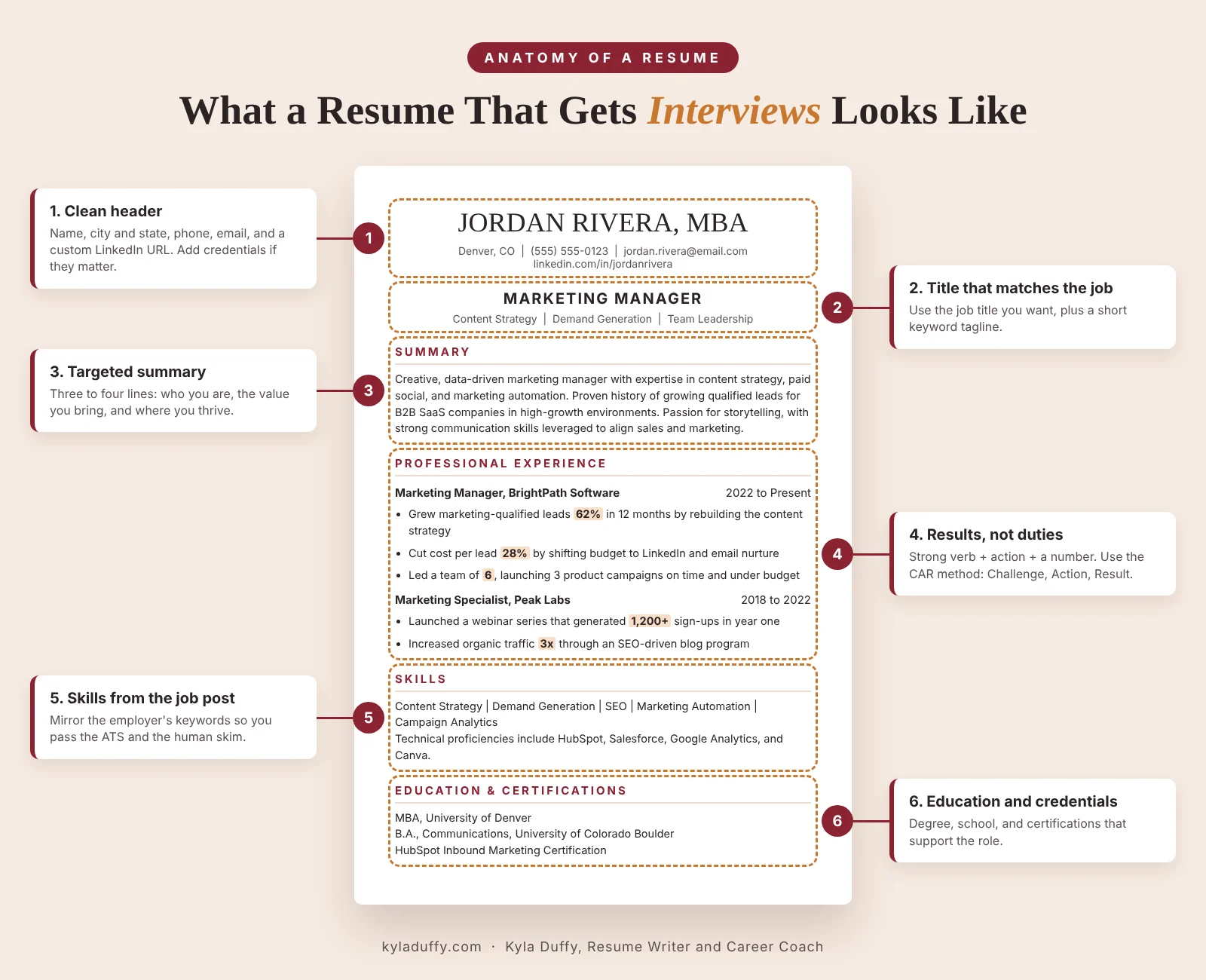
Here’s a stripped-down example of how all of these pieces fit together:
JORDAN RIVERA
Denver, CO | (555) 555-0123 | jordan.rivera@email.com | linkedin.com/in/jordanriveraMARKETING MANAGER
Content Strategy | Demand Generation | Team LeadershipSUMMARY
Creative, data-driven marketing manager with expertise in content strategy, paid social, and marketing automation. Proven history of growing qualified leads for B2B SaaS companies in fast-paced, high-growth environments. Passion for storytelling, with strong communication skills leveraged to align sales and marketing around shared revenue goals.PROFESSIONAL EXPERIENCE
Marketing Manager, BrightPath Software, Denver, CO | 2022 to Present
- Grew marketing-qualified leads 62% in 12 months by rebuilding the content strategy around customer pain points
- Cut cost per lead 28% by shifting budget from low-performing channels to LinkedIn and email nurture
- Led a team of 4 marketers and 2 freelancers, launching 3 product campaigns on time and under budget
SKILLS
Content Strategy | Demand Generation | SEO | Marketing Automation | Campaign Analytics | Team Leadership
Technical proficiencies include HubSpot, Salesforce, Google Analytics, Canva, and Asana.EDUCATION
B.A., Communications, University of Colorado Boulder
Every section points in the same direction. When the title, summary, bullets, and skills tell one story, the reader doesn’t have to work to figure out who you are.
Download My Free ATS-Friendly Resume Template
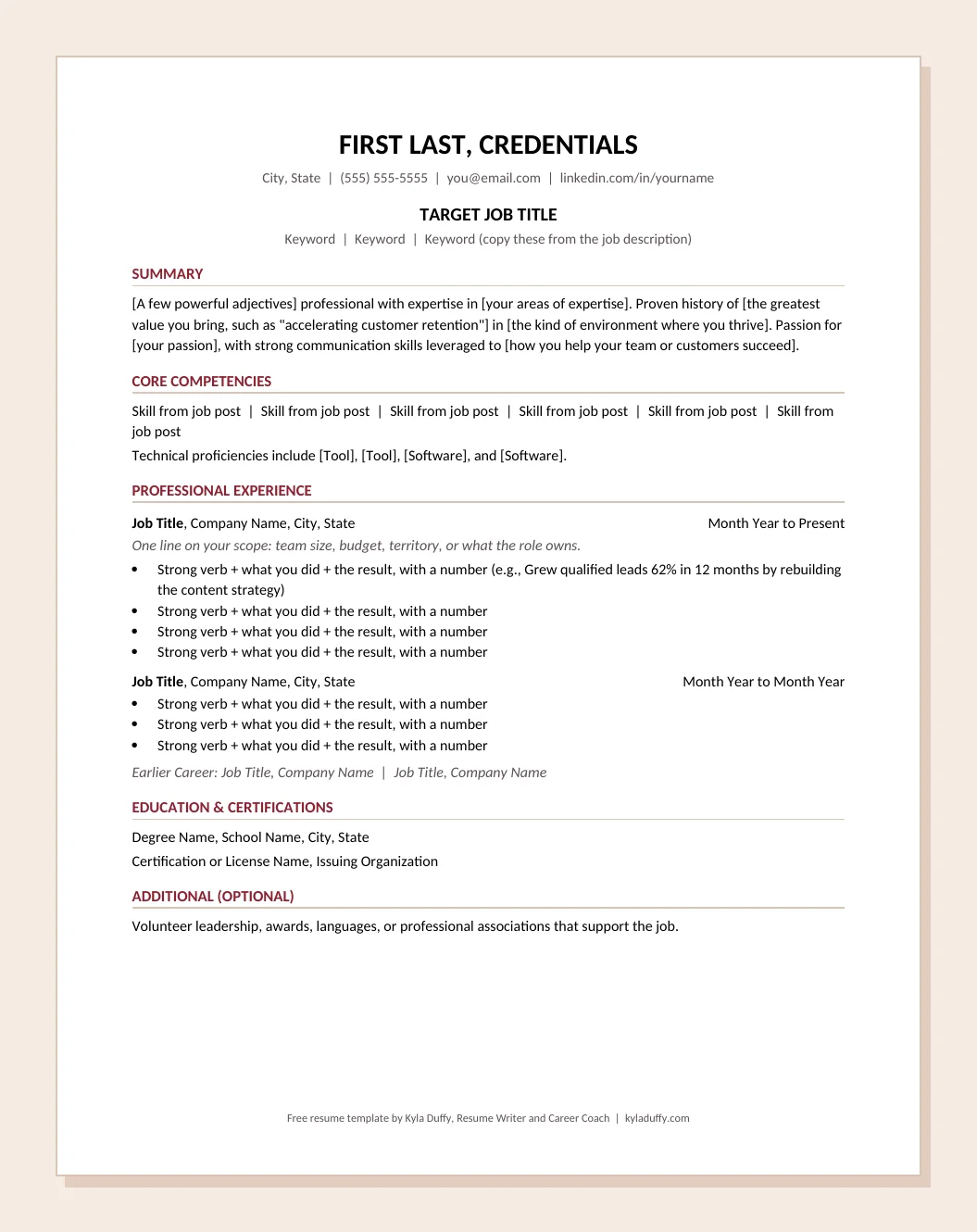
Want to skip the blank page? I built this template on the exact structure from this guide: header, target title, summary template, core competencies, results-based bullets, and education. It’s a simple single-column Word file, so it reads cleanly in applicant tracking systems.
- Fill-in-the-blank summary formula
- Bullet prompts that push you toward results
- A one-page checklist on how to use it
Common Resume Mistakes to Avoid
These are the mistakes I see over and over in the resumes people send me:
- Listing duties instead of results. Your resume isn’t a job description.
- Using one generic resume for everything. Tailor it, every time.
- Burying the good stuff. Your best achievement shouldn’t be bullet number six on page two.
- Fancy templates that break the ATS. Two-column designs with icons look great and often parse terribly.
- Writing a vague summary. “Results-oriented professional” says nothing on its own.
- Talking yourself down. If you led it, say you led it. This isn’t the place for modesty.
Want the full list? Read resume dos and don’ts: the mistakes quietly costing you interviews.
Can You Use AI to Write Your Resume?
Yes, as a helper. ChatGPT is handy for brainstorming action verbs, tightening a clunky sentence, or spotting keywords in a job description. But AI doesn’t know your wins, your numbers, or what makes you different from the other 300 applicants. If you paste in “write me a resume for a project manager,” you’ll get a resume that sounds like every other AI resume a recruiter saw that morning.
Use AI as an editor, not the author. Your resume should sound like you on your best day.
When It Makes Sense to Hire a Professional Resume Writer
You can absolutely write a strong resume with this guide. But it’s worth bringing in help when:
- You’ve applied to dozens of jobs and you’re not getting interviews
- You’re changing careers and can’t figure out how to translate your experience
- You’re moving into a senior, director, or executive role
- You simply don’t have the time (or the stomach) to write about yourself
When you work with me, it’s not a fill-in-the-template job. We talk, I dig into your story, and I position you for the role you want. Here’s how I can help:
- Resume and cover letter writing: A custom, ATS-friendly resume and a cover letter that sounds like you
- LinkedIn profile optimization: So recruiters find you and your profile matches your resume’s story
- On-the-Spot resume, LinkedIn, and cover letter strategy: For when you want expert direction without a full rewrite
- Executive bio writing: For boards, speaking, and senior searches
- Job interview coaching: Because once your resume works, you need to nail the conversation
- Career coaching: For clarity, direction, and a search strategy that doesn’t burn you out
Based in Colorado? I work with clients everywhere, and I also love working with locals as a Denver resume writer and Boulder resume writer and career coach. You can see all options on my rates page, or read what a professional resume writer actually does if you’re still deciding.
Not sure if your resume needs a tweak or a total rewrite?
Get a free 5-point resume review. Upload your resume, and within 2 business days I’ll send you a personal review of the five things I’d change first. No call, no pitch.
Frequently Asked Questions About Writing a Resume
How do I start writing a resume?
Read three job descriptions for roles you want and highlight the skills they repeat. Then write your header, a title that matches the job, and a short summary, keeping the job description next to you as you go.
What should I put on a resume?
Every resume needs a header with contact info, a title and summary, work experience with achievement-focused bullet points, a skills section, and education. Depending on your background, you can add certifications, volunteer work, awards, projects, or languages. Only include what helps you get the specific job.
How long should a resume be?
One page for students and entry-level candidates, one to two pages for mid-career professionals, and two pages for senior and executive candidates. Focus on the last 10 to 15 years of experience and cut anything that doesn’t support the job you’re applying for.
Should I use the same resume for every job?
No. Keep a master resume, then tailor a version for each application by updating your title, summary, skills, and bullet order.
What is the best resume format in 2026?
Reverse-chronological or hybrid formats work best for most people. They’re easy for recruiters to scan and easy for ATS software to read. Use a single-column layout, standard headings, and a simple font. Avoid the functional format unless you have a very specific reason.
Do I still need a cover letter?
Often, yes. A short, targeted cover letter can explain things your resume can’t, like a career change or a move. Here’s my guide to cover letters that actually get read.
Where can I get a free resume template?
You can download my free ATS-friendly resume template in Word format. It follows the same structure as this guide and includes a fill-in-the-blank summary formula and bullet prompts.
Can someone review my resume for free?
Yes. I offer a free 5-point resume review. Upload your resume, and within 2 business days I’ll send you the five things I’d change first. No call, no pitch. Request your free resume review.
Final Thoughts: Your Resume Is a Marketing Document, So Market Yourself
Learning how to write a resume isn’t about memorizing rules. It’s about knowing who you are, knowing what the employer needs, and connecting those two things clearly enough that someone can see it in seven seconds.
Start with clarity. Study the job. Lead with results. Tailor every time. And be patient with the process.
If you get stuck, I’m here. Send me your resume for a free 5-point review, or let me write it for you. Either way, I believe in your ability to land something great. Now go get it!

About the author: Kyla Duffy
Professional Resume Writer, LinkedIn Strategist, and Job Interview Coach | Boulder, Colorado
Kyla Duffy, the “Career Alchemist,” has been writing resumes and coaching job seekers since 2015. She has helped 4,000+ professionals, ranks in the top 1% of Upwork freelancers with a 100% Job Success score, and holds a 4.9-star rating from 55 Google reviews. Kyla is a member of Career Thought Leaders and a former instructor at the University of Colorado Boulder, and she has called Boulder home since 2001.